Published: 12/13/2013

Ever feel like The Man is creeping on your cell phone? These days, it seems like it’s more than just a fleeting chance. The people over at Scottevest have come up with a pretty good solution: a pocket-sized Faraday cage.
If this thing is really a Faraday cage, sticking your cell phone into it would cause it to loose contact with all signals. No 4G, no 3G, no GPS, not even Wi-Fi. Your phone would be 100% not reachable by anyone, friend friend or foe.
And it doesn’t just work on your cell phone, either. Stick your credit card in one, and no one will be able to skim your information using the RFID.
There has been some concern that this thing might not work, but if it really is a Faraday cage, then it works. I would have no reason to believe that it isn’t a true Faraday cage, as they are neither expensive or difficult to make.
Published: 10/01/2013
Dear Mrs. Deer,
I wanted to take this opportunity to apologize for almost stepping on you last week as I was taking my run through the park. It was not my intention to startle you in such a way; I was simply going for a jog, and did not mean to disturb your afternoon nap.
Likewise, I’m sorry that, after you sprang up to run away, I screamed at you and made those ‘Kung Fu’ motions with my arms and legs. While I am sure that you were further alarmed by me doing this, it was simply a result of you startling me as well.
I realize that while I often run through the woods there, it is your home, and there is no excuse for frightening you the way that I did. I would consider it a great inconvenience if you were to barge into my living room, so I can imagine how such an intrusion must have made you feel.
Again, I’m sorry for showing up so abruptly. It’s probably of little consequence, but you may take some comfort in the fact that the encounter almost made me crap myself, too.
Hoping to see you again soon, although from a slightly greater distance,
Brock
Published: 12/11/2012
 The newest version of WordPress, 3.5, (code-named ‘Elvin’) dropped today, three months and five days after 3.4.2. Major changes in this release include an upgraded media manager, a new default theme, dashboard resolution improvements, and some behind the scenes improvements.
Upgrading from 3.4.2 was as easy as it always is for WordPress upgrades. Maybe I have been lucky, but I’ve never had an issue with any upgrade, and this one was no different. Speed has never been a problem, either; the upgrade completed in about 20 seconds, and I’m off trying the new features.
New Media Manager
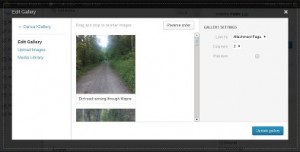
The biggest change that I see in version 3.5 is the new media manager. The interface has changed drastically, and at first I felt that it might be a bit overwhelming for the less tech savvy. After using it, though, I realized it only looked intimidating. It’s actually quite easy to use if you just dive in.

WordPress 3.5 Image Gallery
Image galleries have been around since 2.5, but they have never been easy to work with. You had to upload, attach, then manually put the gallery shortcode in. With the new media manager, creating galleries becomes trivial. You can drag and drop the images to reorder, caption them quickly, and with button-click ease, insert them into you posts.
I had always been frustrated by the lack of a good image gallery in WordPress. The NextGEN Gallery plugin always filled the gap, but with the improvements, I have started removing NextGEN from many of my sites. NextGEN’s image arrangement was always lacking, I thought. While it gives you nice pop-ups for each image in the gallery, site visitors can’t comment on individual images, which I hate. I guess it depends on what you are looking for out of your image gallery. I will still use NextGEN in given situations, but it won’t automatically be installed on new sites anymore.
Another new function of the media manager is the ability to insert several images into a post at once, then write the post around the inserted images. I tend to write first, then insert images later, so I’m not sure how useful this will be for me, but I can see how others would find it useful.
New Default Theme
Seeing as how it’s almost 2013, I guess it was just about time for the Twenty Twelve theme release. It’s everything that Twenty Ten and Eleven were, updated and kept light. It’s a fine default theme and its look stays pretty consistent across various devices. As they say on the About page: simple, flexible, and elegant.
Dashboard Resolution Improvements
Even on smaller screens, the WordPress dashboard could get a little grainy if you zoomed in. On higher resolution devices, it could get a little grainy if you stood across the room. Well, no more, even when zoomed in as far as you can. It’s eye candy for the backend, for sure, and really doesn’t have the slightest impact on reaching the people you are trying to reach with your website, but it really does look great.
Square Buttons
Speaking of changes that have no impact on reaching people, the buttons are more square now. I know, not Earth-shaking, but I did notice. Moving on…
Behind the Scenes Stuff
There are some things that you might not notice if you’re not a developer. TinyMCE, the editor you more than likely use to edit all your posts, updates to the latest version, as does jQuery and SimplePie.
The XML-RPC WordPress API, which is used to post from your smart phone or tablet, is now always enabled. I see no reason it shouldn’t have always been by default. Saves me a step when setting up a new site, seeing as how that was one of the first options I changed within the first five minutes after setup.
All in All
I’m pretty impressed. It’s a nice release. Seems stable and as speedy as the previous version, and has noteworthy improvements. And I really like the new media manager. And the square buttons.